
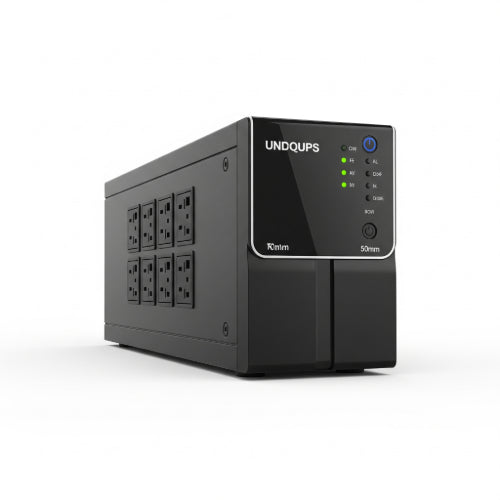
Safeguarding Your Office's Brains: Managing IT Equipment with the Right UPS System
In today's fast-paced business world, your office's IT equipment is the heartbeat of your operations. From servers and network switches to individual workstations and critical communication systems, a sudden power outage or voltage fluctuation can bring everything to a screeching halt. This isn't just an inconvenience; it can lead to data loss, corrupted files, damaged hardware, and significant financial losses due to downtime.
This is where an Uninterruptible Power Supply (UPS) system becomes your office's unsung hero. More than just a fancy surge protector, a UPS provides backup power when the main supply fails, giving you time to gracefully shut down equipment or ride out short outages. But with various types and capacities available, how do you choose and manage your office's IT equipment with the right UPS system? Let's break it down.
Why Your Office Needs a UPS System (It's More Than Just Blackouts)
While power outages are the most obvious threat, your IT equipment faces other, more frequent power disturbances:
- Sags (Brownouts): Momentary drops in voltage that can cause equipment to malfunction or shut down.
- Surges/Spikes: Brief, high-voltage increases that can fry sensitive electronics.
- Line Noise: Interference on the power line that can cause errors or instability.
- Frequency Variations: Fluctuations in the alternating current (AC) frequency that can impact equipment performance.
A good UPS system acts as a buffer, protecting your valuable IT assets from these silent killers, ensuring clean, consistent power delivery.
Choosing the Right UPS Type for Your Office
UPS systems generally fall into three main categories, each offering different levels of protection and cost:
-
Standby (Off-line) UPS:
- How it works: This is the most basic and economical type. The UPS directly supplies utility power to your equipment. When a power outage occurs, it switches to battery power.
- Best for: Individual workstations, non-critical PCs, and small office equipment where a momentary switchover time (typically 2-10 milliseconds) is acceptable.
- Pros: Inexpensive, compact.
- Cons: Less protection against sags, surges, and line noise; slight delay in power transfer.
-
Line-Interactive UPS:
- How it works: This type is more advanced than standby. It includes an autotransformer that regulates voltage fluctuations (sags and surges) without switching to battery power. It only switches to battery during a full outage.
- Best for: Small to medium-sized businesses, office servers, network closets, and critical workstations where consistent power quality is important but a full "online" system isn't necessary.
- Pros: Better power conditioning, longer battery life (due to less frequent switching), more efficient than online UPS.
- Cons: Still a brief transfer time to battery during a blackout.
-
Online (Double Conversion) UPS:
- How it works: This is the most robust type of UPS. It continuously converts incoming AC power to DC and then back to AC power, effectively creating a "new", clean power source. The connected equipment always runs on this regenerated power, with the batteries constantly being charged.
- Best for: Mission-critical servers, large data centers, sensitive medical equipment, and any application where zero transfer time and perfect power quality are paramount.
- Pros: Zero transfer time, superior power conditioning (isolates equipment from all power disturbances), constant power.
- Cons: Most expensive, less energy-efficient (due to continuous conversion), generates more heat.
Sizing Your UPS: The Crucial Calculation
Selecting the right size UPS is critical. An undersized UPS won't provide enough runtime, while an oversized one is an unnecessary expense. You need to calculate the total power consumption (in Watts or VA) of all the equipment you intend to connect.
Steps to Calculate UPS Capacity:
- List all equipment: Servers, switches, routers, monitors, PCs, phones, etc.
-
Find the power consumption (Watts or VA): Look for the power ratings on the equipment's labels, manuals, or manufacturer websites. If only Amps and Voltage are listed, use the formula:
Watts = Volts x Amps(for resistive loads) orVA = Volts x Amps(for inductive loads, which most IT equipment is). - Sum the total Watts/VA: Add up the power consumption of all devices.
- Add a buffer: Always add a 20-30% buffer for future expansion and to prevent overloading the UPS.
- Consider Runtime: Decide how long you need your equipment to run on battery power. This depends on whether you need time for a graceful shutdown (5-10 minutes) or to ride out longer outages (30 minutes to several hours). Longer runtime requires larger battery packs or external battery modules.
Example: If your total equipment draws 800 Watts, a 1000VA/900W UPS (most UPS systems have a power factor, so VA is usually higher than Watts) would be a good starting point, providing a decent buffer.
Key Features to Look For:
- Outlet Types and Quantity: Ensure the UPS has enough and the right types of outlets (e.g., NEMA 5-15R for standard plugs, C13/C19 for server power cords).
- Management Software: Many UPS systems come with software that allows for graceful shutdowns, power monitoring, and alerts.
- Network Connectivity: For larger offices, a network card allows for remote monitoring and management.
- Switched Outlets: Some UPS models allow you to remotely power cycle individual outlets – a huge convenience for rebooting frozen devices.
- Hot-Swappable Batteries: Allows for battery replacement without shutting down connected equipment.
- Energy Efficiency (ECO Mode): For online UPS, look for models with an ECO mode to reduce energy consumption during stable power conditions.
Installation and Ongoing Management Tips:
- Dedicated Circuit: Whenever possible, connect your UPS to a dedicated electrical circuit to prevent overloading and ensure stable power.
- Proper Placement: Place the UPS in a cool, well-ventilated area, away from direct sunlight, heat sources, and excessive dust. Ensure adequate clearance for airflow.
- Cable Management: Keep power cables organized to prevent tripping hazards and improve airflow.
- Test Regularly: Perform battery self-tests and simulated power outages (if safe to do so) periodically to ensure the UPS is functioning correctly and its batteries are healthy.
- Monitor Alarms: Pay attention to audible alarms or dashboard alerts from your UPS. These often indicate battery issues, overloads, or other problems.
- Battery Replacement: UPS batteries have a finite lifespan (typically 3-5 years). Plan for proactive battery replacements to avoid unexpected failures. Follow manufacturer guidelines for replacement.
- Software Updates: Keep the UPS management software and firmware updated for optimal performance and security.
- Training: Ensure relevant staff know how to properly interpret UPS alerts and perform basic shutdown procedures.
Conclusion
A well-chosen and properly managed UPS system is an indispensable asset for any modern office. It acts as the guardian of your IT equipment, shielding it from the unpredictable nature of power grids. By investing in the right UPS, you're not just buying backup power; you're buying peace of mind, protecting your data, extending the life of your hardware, and ensuring the continuous flow of your business operations. Don't wait for the lights to go out to realize its importance – empower your office's IT infrastructure today!





