
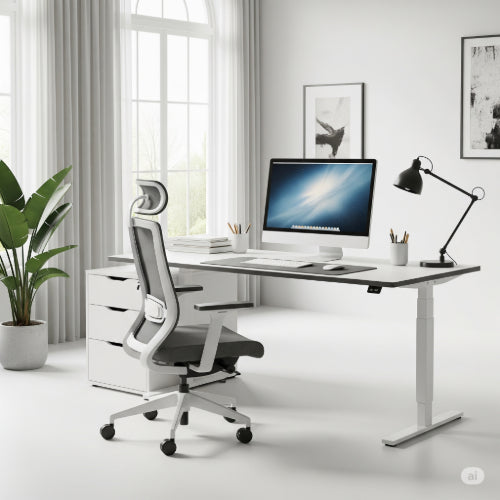
Your Perfect Productivity Hub: Tips for Setting Up the Ultimate Home Office
The rise of remote work has transformed the spare room, the corner of a living room, or even a dedicated nook into the command center for many professionals. But creating a truly ultimate home office goes beyond just finding a spot for your laptop. It's about crafting a space that inspires productivity, minimizes distractions, and supports your well-being.
Here are key tips to help you set up a home office that truly elevates your work experience:
1. Location, Location, (Quiet) Location:
- Dedicated Space is Ideal: If possible, establish your home office in a room with a door that can be closed. This provides a clear boundary between work and home life, minimizing interruptions and helping you mentally "clock out" at the end of the day.
- Minimize Traffic: Choose a spot away from high-traffic areas of your home, like the kitchen or main living room, especially if you have family members at home during your work hours.
- Consider Natural Light: Position your desk near a window to leverage natural light. It reduces eye strain, improves mood, and can even boost productivity. Just be mindful of glare on your screen.
2. Ergonomics: Invest in Your Body (and Future Self!)
- The Right Chair is Non-Negotiable: This is arguably the most important investment. A good ergonomic office chair provides proper lumbar support, adjustable height, and comfortable armrests to prevent back pain and discomfort during long hours.
- Adjustable Desk Options: A standing desk or a desk converter allows you to alternate between sitting and standing, which is excellent for circulation and energy levels. Even if you don't go full standing, ensure your desk height allows your arms to be at a 90-degree angle when typing.
- Monitor at Eye Level: Your monitor should be positioned so the top of the screen is at or slightly below eye level. Use a monitor arm or riser to achieve this, freeing up valuable desk space below.
- Keyboard and Mouse: Choose an ergonomic keyboard and mouse that fit your hand comfortably to prevent wrist strain.
3. Tech Essentials: Powering Your Productivity
- Reliable Internet: A fast, stable internet connection is the backbone of any home office. Consider upgrading your plan or optimizing your Wi-Fi signal with a mesh system if needed.
- Quality Webcam and Microphone: For video calls, a dedicated external webcam and microphone often offer superior audio and video quality compared to built-in laptop options, ensuring you look and sound professional.
- Headphones for Focus: Noise-canceling headphones are invaluable for blocking out household distractions and maintaining focus during calls or intense work sessions.
- Backup Power: Consider a UPS (Uninterruptible Power Supply) to protect your electronics and prevent data loss during power fluctuations or outages.
4. Organization & Aesthetics: A Place for Everything
- Effective Storage: Incorporate shelves, drawers, and vertical organizers to keep your desk clutter-free. A clean workspace contributes to a clear mind. Utilize wall space with floating shelves or pegboards.
- Cable Management: Tame the cable monster! Use cable ties, sleeves, and management boxes to keep wires neat and out of sight. This instantly makes your space look more professional and organized.
- Personal Touches (Minimalist Style): While minimalism is key, don't shy away from adding elements that inspire you. A plant, a piece of art, or a framed photo can add personality without creating clutter.
- Lighting Layers: Supplement natural light with good task lighting (a desk lamp) and ambient lighting for overall comfort. Avoid harsh overhead lights.
5. Boundaries and Habits: The Ultimate Tool
- Set a Schedule: Establish clear start and end times for your workday, just as you would in a traditional office.
- Take Breaks: Step away from your desk regularly. Go for a short walk, stretch, or do something completely unrelated to work.
- Delineate Work and Life: When the workday is over, "shut down" your office. Close the door, put away your laptop, or even cover your desk to signal the transition.
Setting up the ultimate home office is an ongoing process of refinement. Pay attention to what works for you, experiment with different setups, and continuously adapt your space to support your evolving work needs. When done right, your home office can become a sanctuary of focus and a powerful engine for your professional success.





