
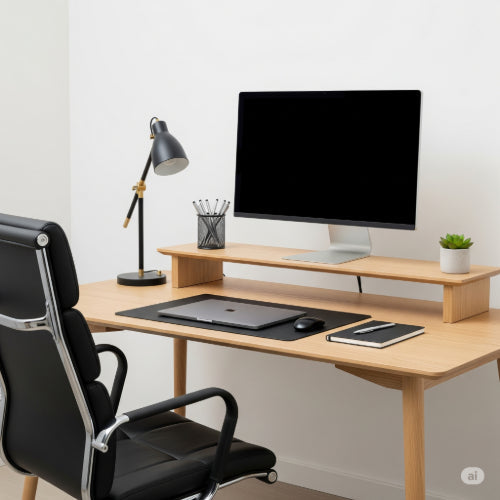
How to Set Up a Professional Home Office: Your Guide to Productivity and Comfort
In today's evolving work landscape, the concept of a "home office" has shifted from a makeshift corner to a vital, dedicated workspace. Whether you're a freelancer, a remote employee, or an entrepreneur, establishing a professional home office isn't just a luxury; it's a necessity for productivity, focus, and maintaining a healthy work-life balance.
This guide will walk you through the essential steps to create a home office that not only looks professional but also enhances your efficiency and well-being.
1. Choose the Right Location: Define Your Space
The first and most critical step is selecting the right spot. Avoid common areas if possible, as they invite distractions.
- Dedicated Room: Ideally, a spare bedroom, converted garage, or even a large closet can serve as a full-fledged office. This provides maximum privacy and minimizes interruptions.
- Quiet Corner: If a dedicated room isn't an option, find a quiet corner in your living room, bedroom, or even a hallway. Use room dividers, shelves, or furniture placement to visually and mentally separate your workspace from your living space.
- Consider Natural Light: Position your desk near a window if possible. Natural light can boost mood, reduce eye strain, and improve overall productivity. Avoid direct glare on your screen.
2. Prioritize Ergonomics: Invest in Your Health
Your health and comfort directly impact your productivity. Don't skimp on ergonomic essentials.
- Ergonomic Chair: This is perhaps the most important investment. Look for a chair with adjustable height, lumbar support, armrests, and recline features. Your feet should be flat on the floor, and your arms parallel to your desk when typing.
- Adjustable Desk (Optional but Recommended): A standing desk allows you to alternate between sitting and standing, which can alleviate back pain and improve circulation. Even a standing desk converter for your existing desk can make a big difference.
- Monitor Height: Position your monitor so the top of the screen is at or slightly below eye level, about an arm's length away. Use a monitor stand or risers if needed. If using multiple monitors, arrange them ergonomically.
- Keyboard and Mouse: Opt for an ergonomic keyboard and mouse to prevent wrist strain and carpal tunnel syndrome.
3. Essential Technology: Powering Your Work
Reliable technology is the backbone of any professional office.
- Computer: Whether a powerful desktop or a capable laptop, ensure it meets the demands of your work. Consider processor speed, RAM, and storage.
- Reliable Internet: A stable and fast internet connection is non-negotiable for remote work. Consider upgrading your plan or investing in a mesh Wi-Fi system if you experience dead zones.
- Monitor(s): A larger monitor or dual monitors can significantly boost productivity by allowing you to view multiple applications simultaneously.
- Webcam and Microphone: Essential for virtual meetings. Many laptops have built-in options, but an external webcam and a good quality microphone often offer superior audio and video.
- Printer/Scanner: While not always necessary, a reliable all-in-one printer/scanner can be very useful for documents.
- Power Strip/Surge Protector: Protect your valuable electronics and ensure you have enough outlets.
4. Lighting: Beyond the Monitor
Good lighting is crucial for reducing eye strain and maintaining focus.
- Natural Light: Maximize it as discussed above.
- Ambient Lighting: Ensure your room has good general lighting. Avoid working in a dimly lit room with only your monitor as a light source.
- Task Lighting: A good desk lamp provides direct illumination for reading, writing, or other detailed tasks without causing glare on your screen.
5. Organization and Storage: Keep it Clutter-Free
A tidy workspace promotes a clear mind.
- Shelving and Drawers: Invest in shelves, drawers, or filing cabinets to keep documents, supplies, and equipment organized and out of sight.
- Cable Management: Untamed cables are unsightly and can be a tripping hazard. Use cable ties, sleeves, or cable management boxes to keep cords neat and organized.
- Declutter Regularly: Make it a habit to put things away after use and declutter your desk at the end of each workday.
6. Personalize Your Space: Make it Yours
While maintaining professionalism, don't shy away from adding personal touches that inspire you.
- Plants: A desk plant can add a touch of nature and improve air quality.
- Art/Decor: A favorite piece of art, a framed photo, or a small decorative item can make your space more inviting and personalized.
- Inspiration Board: A whiteboard or corkboard can be great for jotting down ideas, pinning up notes, or creating a vision board.
7. Set Boundaries: Separate Work from Life
A professional home office is also about creating mental boundaries.
- Designated Work Hours: Try to stick to a consistent work schedule.
- "Commute": Even a short walk around the block before and after work can help you transition between your personal and professional roles.
- Unplug: When the workday is over, physically leave your office space if possible. Close the door (if you have one) and resist the urge to "just check one more email."
Conclusion
Setting up a professional home office is an investment in your productivity, comfort, and overall well-being. By thoughtfully choosing your space, prioritizing ergonomics, investing in the right technology, and maintaining an organized and inspiring environment, you can create a home office that not only meets your professional needs but also becomes a place where you genuinely enjoy working.





