
Keeping Your Cool: How to Choose the Best Cooling System for Your Servers
In the heart of every data center, server room, or even a small office IT closet, a silent battle is constantly being waged: the fight against heat. Servers, by their very nature, generate a significant amount of heat, and if left unchecked, this heat can lead to performance throttling, hardware failures, and ultimately, costly downtime. A well-designed cooling system isn't just a luxury; it's a critical component for ensuring the longevity, reliability, and efficiency of your entire IT infrastructure.
But with so many cooling options available, how do you choose the best one for your specific needs? Let's break down the key factors and common cooling strategies.
Why Server Cooling is Non-Negotiable
Before diving into solutions, understand the stakes:
- Hardware Longevity: Excessive heat drastically shortens the lifespan of CPUs, RAM, hard drives, and other components.
- Performance Degradation: Servers will automatically "throttle" (reduce their speed) to prevent overheating, leading to slower application performance.
- System Instability: Overheated components can cause unexpected crashes, errors, and data corruption.
- Increased Energy Consumption: Inefficient cooling means your systems work harder, consuming more power, both for computing and for cooling itself.
- Downtime: The ultimate nightmare. Overheating can lead to critical systems failing, resulting in lost productivity and revenue.
Key Factors to Consider When Choosing a Cooling System
The "best" cooling system isn't a one-size-fits-all solution. It depends heavily on your specific environment and requirements:
-
Heat Density (kW per Rack/Sq Ft):
- Low Density: A few servers in a small office.
- Medium Density: Dedicated server room with a few racks.
- High Density: Modern data centers with densely packed, high-performance computing (HPC) or virtualization servers. This is the most crucial factor determining the required cooling power.
- Room Size and Layout: The physical dimensions, ceiling height, and existence of hot/cold aisles will influence viable cooling strategies.
- Existing Infrastructure: Do you have raised floors, dedicated HVAC, or existing rack systems?
- Budget: Initial CapEx (capital expenditure) for installation and ongoing OpEx (operational expenditure) for energy consumption.
- Redundancy Requirements: How critical is your uptime? Do you need N+1 or 2N redundancy for cooling?
- Scalability: How likely are you to expand your server footprint in the future?
- Environmental Factors: Local climate, humidity levels, and availability of water (for liquid cooling).
Common Server Cooling Strategies
Let's explore the prevalent methods for keeping servers cool:
1. Room-Based Cooling (CRAC/CRAH Units)
- How it Works: Computer Room Air Conditioners (CRAC) and Computer Room Air Handlers (CRAH) are large, dedicated HVAC units designed specifically for data centers. CRAC units use refrigerants, while CRAH units use chilled water. They cool the entire room, often using raised floors to deliver cold air.
- Best For: Lower to medium density server rooms where cooling needs are distributed across the space.
- Pros: Familiar technology, cools the entire environment, often provides humidity control.
- Cons: Less efficient for high-density racks (hot spots can form), can lead to hot air recirculation, high energy consumption if not optimized.
2. Row-Based Cooling (In-Row Coolers)
- How it Works: Cooling units are placed directly within the server rows, next to the racks. They draw hot air directly from the hot aisle and release cold air into the cold aisle.
- Best For: Medium to high-density environments, addressing hot spots more effectively.
- Pros: More targeted and efficient cooling, reduces hot/cold air mixing, better for incremental scaling.
- Cons: Can take up rack space, requires careful planning of row layout.
3. Rack-Based Cooling (Rear-Door Heat Exchangers, In-Rack Cooling)
-
How it Works: Cooling is applied directly to the rack itself.
- Rear-Door Heat Exchangers: A heat exchanger (often liquid-based) replaces the rear door of the server cabinet, capturing hot air as it exits the servers.
- In-Rack Cooling Units: Small cooling units mounted directly inside the rack.
- Best For: Very high-density racks (e.g., HPC clusters, blade servers), where traditional methods struggle.
- Pros: Highly efficient and targeted cooling, excellent for extreme heat loads, enables very high rack densities.
- Cons: Higher initial cost, requires liquid connections (for heat exchangers), can be more complex to implement.
4. Containment Systems (Hot Aisle / Cold Aisle Containment)
-
How it Works: Physical barriers (panels, doors) are used to separate hot exhaust air from cold supply air.
- Hot Aisle Containment (HAC): Encloses the hot aisle, preventing hot air from mixing with the cold supply.
- Cold Aisle Containment (CAC): Encloses the cold aisle, ensuring all cold air is directed to server inlets.
- Best For: Optimizing the efficiency of any room-based or row-based cooling system, applicable across various densities.
- Pros: Dramatically improves cooling efficiency, reduces energy consumption, eliminates hot spots caused by air mixing.
- Cons: Requires precise rack alignment and sealing, can impact fire suppression systems (needs proper design).
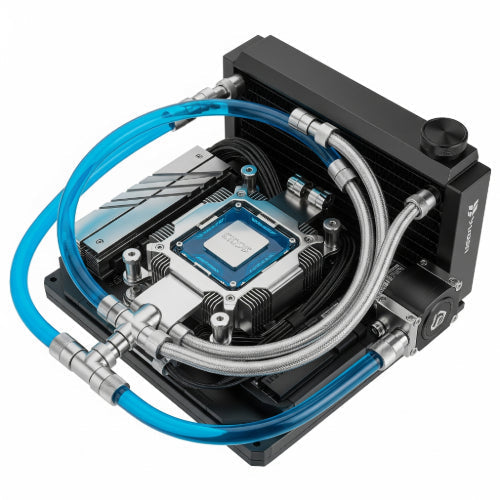
5. Liquid Cooling (Direct-to-Chip, Immersion Cooling)
-
How it Works:
- Direct-to-Chip: A liquid coolant is circulated directly over or through hot components (CPU, GPU) via cold plates.
- Immersion Cooling: Servers are submerged entirely in a non-conductive dielectric fluid.
- Best For: Extremely high-density computing, specialized HPC, and future-proofing.
- Pros: Highest cooling efficiency, significantly reduces energy consumption, quieter operation, enables unprecedented rack densities.
- Cons: High initial cost, requires specialized infrastructure, new territory for many IT teams, maintenance considerations for fluid.
Making Your Decision
- Assess Your Current Needs: Quantify your current heat load in kW and project future growth.
- Evaluate Your Space: What are the physical constraints and opportunities?
- Consider Your Budget: Balance upfront costs with long-term energy savings.
- Prioritize Efficiency and Redundancy: How important is uptime, and how much energy do you want to save?
- Consult Experts: For complex or large-scale deployments, engage with data center design specialists or cooling vendors. They can perform heat load calculations and design optimal solutions.
Choosing the right server cooling system is a critical investment in your IT infrastructure's health and performance. By understanding your specific needs and the options available, you can build a resilient and efficient environment that keeps your servers running cool, stable, and ready to meet the demands of your business. Don't let your servers sweat – give them the cool environment they deserve!





