
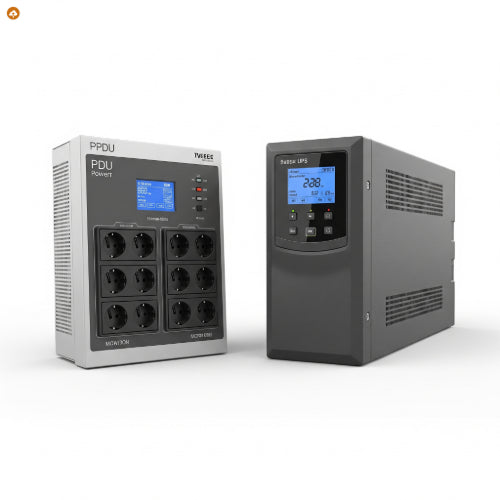
PDU vs. UPS: Which One Should You Choose for Your Business?
In the intricate world of business technology, ensuring reliable power is non-negotiable. From sensitive servers to critical network equipment, every device needs consistent, clean power to function optimally. When planning your power infrastructure, you'll inevitably encounter two key acronyms: PDU (Power Distribution Unit) and UPS (Uninterruptible Power Supply). While often confused, they serve distinct, yet complementary, roles in safeguarding your operations.
So, for your business, which one should you choose? Or do you need both? Let's break down their functions, pros, and cons.
Understanding the Roles: Not the Same Thing!
Before diving into the comparison, it's crucial to understand what each device actually does:
-
PDU (Power Distribution Unit): Imagine a sophisticated, heavy-duty power strip designed for IT environments. A PDU's primary function is to efficiently distribute electrical power from a single input source (like a wall outlet or a UPS) to multiple devices. They are designed for organized power distribution within server racks or data centers, often offering features like individual outlet control, metering, and environmental monitoring. A PDU does NOT provide backup power.
-
UPS (Uninterruptible Power Supply): A UPS is a backup power system. Its main job is to provide emergency power to connected equipment when the main power source fails or experiences fluctuations. It contains internal batteries that kick in almost instantaneously (milliseconds) to prevent downtime, data loss, or damage during power outages, surges, sags, or other electrical disturbances. A UPS does NOT inherently distribute power to many outlets; it provides conditioned power and backup power to its own outlets, or to a PDU.
The Power of Choice: When to Opt for Each
The Uninterruptible Power Supply (UPS): Your Business's Safety Net
A UPS is essential for protecting critical equipment from the unpredictability of power.
Pros of a UPS:
-
Instant Power Backup: Provides immediate, seamless power to connected devices when the main power fails, allowing for a graceful shutdown of systems or continuous operation for short durations. This is vital for preventing data corruption and hardware damage.
-
Power Conditioning/Protection: Most UPS units offer surge protection, voltage regulation, and filtering of electrical noise, providing "clean" power to sensitive electronics, extending their lifespan.
-
Downtime Prevention: Minimizes costly business interruptions by keeping critical systems online during short outages or providing time for generators to kick in.
-
Data Integrity: Ensures that servers, workstations, and network devices have enough time to save data and shut down properly, preventing loss of unsaved work.
Cons of a UPS:
-
Cost: UPS units, especially those with larger capacities and longer runtimes, can be a significant investment.
-
Limited Runtime: Batteries only provide power for a limited duration (minutes to hours, depending on load and UPS size). They are not a long-term power solution like a generator.
-
Maintenance: Batteries have a finite lifespan and require eventual replacement, adding to long-term maintenance costs.
-
Size and Weight: Larger UPS units can be heavy and take up considerable floor or rack space.
-
Limited Outlets: A single UPS typically has a finite number of outlets, which might not be enough for all your devices.
Choose a UPS if your business:
-
Cannot tolerate any downtime for critical systems (e.g., servers, network switches, point-of-sale systems, security systems).
-
Operates sensitive electronic equipment prone to damage from power fluctuations.
-
Needs time to safely shut down equipment during an extended power outage.
-
Wants to protect against surges, sags, and other "dirty power" issues.
The Power Distribution Unit (PDU): Your Organization and Management Hub
A PDU is about efficient and controlled power distribution, especially in rack environments.
Pros of a PDU:
-
Organized Power Distribution: Consolidates multiple power connections into a single input, tidying up cabling in racks and server cabinets.
-
Increased Outlet Density: Provides many outlets (e.g., 8, 16, 24+) in a compact form factor (often rack-mountable), maximizing the number of devices you can power from a single source.
-
Load Balancing: Advanced PDUs (metered or switched) allow you to monitor power consumption at the outlet or branch circuit level, helping to prevent overloads and optimize power usage.
-
Remote Management: Switched PDUs allow IT administrators to remotely turn individual outlets on or off, reboot frozen equipment, or power cycle devices from anywhere with network access.
-
Environmental Monitoring: Some intelligent PDUs integrate with environmental sensors to monitor temperature and humidity within the rack, preventing overheating issues.
-
Cost-Effective (for distribution): For simply distributing power without backup, PDUs are much less expensive than UPS systems.
Cons of a PDU:
-
No Backup Power: This is the most crucial distinction. A PDU offers absolutely no protection against power outages. If the power source it's connected to fails, everything plugged into the PDU also fails.
-
Limited Power Conditioning: Basic PDUs offer minimal or no power conditioning, relying on the upstream power source (like a UPS or main utility) for clean power. Some may include surge suppression, but it's not their primary function.
-
Technical Complexity (for advanced models): Intelligent or switched PDUs require network setup and configuration, which can be more complex than basic models.
Choose a PDU if your business:
-
Needs to efficiently distribute power to multiple devices within a server rack or cabinet.
-
Requires precise power monitoring and management.
-
Benefits from remote control over individual device power (e.g., for remote reboots).
-
Already has a UPS or another reliable primary power source (like a generator) and needs to distribute that power effectively.
Do You Need Both? The Most Common Scenario
For most businesses with critical IT infrastructure, the answer is a resounding YES, you need both a UPS and a PDU.
Here's why and how they work together:
-
The UPS provides the clean, conditioned, and uninterrupted power. It acts as the first line of defense against power disturbances and outages.
-
The PDU plugs into the UPS (or directly into a stable, conditioned power source) and then efficiently distributes that protected power to all your individual devices within a rack.
This layered approach ensures maximum protection and efficient power management. The UPS safeguards against power quality issues and outages, while the PDU provides the organizational structure and often, the intelligent control, for all your connected equipment.
For optimal resilience, especially in environments where uptime is paramount, many businesses implement redundant UPS systems feeding into redundant PDUs. This "belt-and-suspenders" approach virtually eliminates single points of failure in the power delivery chain.
The Bottom Line
Don't view PDUs and UPS systems as interchangeable. They are distinct tools that solve different problems. A UPS protects your equipment from power issues, while a PDU organizes and distributes that power. For comprehensive power protection and management, particularly in server rooms and data centers, integrating both a UPS and an intelligent PDU into your power strategy is not just a recommendation—it's a necessity.





