
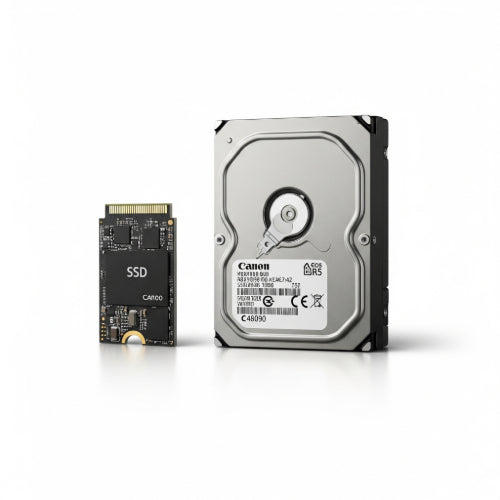
SSD vs. HDD: Which Storage Solution Is Right for You?
In the world of computing, where speed and storage capacity are paramount, the choice between Solid State Drives (SSDs) and Hard Disk Drives (HDDs) is a fundamental one. While both serve the purpose of storing your data, they do so in vastly different ways, impacting performance, cost, and durability. Understanding these differences is key to choosing the right storage solution for your computer, whether it's for personal use or your business.
Let's break down the characteristics of SSDs and HDDs to help you make an informed decision.
Hard Disk Drives (HDDs): The Traditional Workhorse
HDDs have been the standard storage medium for decades. They are mechanical devices that store data on spinning platters coated with magnetic material. A read/write head moves across these platters to access data, similar to a record player.
Pros:
- Cost-Effective: HDDs offer a significantly lower cost per gigabyte compared to SSDs. This makes them ideal for storing large amounts of data where raw speed isn't the absolute top priority.
- High Capacity: You can find HDDs with capacities ranging from 1TB to 20TB or even more, making them excellent for archiving, media libraries, or extensive backups.
- Widespread Availability: HDDs are still readily available in various form factors and are compatible with almost all computer systems.
Cons:
- Slower Speeds: Due to their mechanical nature, HDDs are much slower than SSDs in terms of boot times, application loading, and file transfer speeds.
- Fragile: Being mechanical, HDDs are susceptible to damage from drops or impacts, which can lead to data loss.
- Noise and Heat: The spinning platters and moving parts generate some noise and heat, though modern HDDs are generally quiet.
- Higher Power Consumption: Generally consume more power than SSDs, which can slightly impact laptop battery life.
Best Use Cases for HDDs:
- Mass Storage: Ideal for storing large archives of photos, videos, documents, or games where quick access isn't crucial.
- Backup Drives: Cost-effective for creating full system backups or storing large data sets.
- Secondary Drives: Often used as a secondary drive in a system that has an SSD for the operating system and frequently used applications.
- Servers: For servers where vast amounts of data need to be stored, and budget is a significant factor.
Solid State Drives (SSDs): The Speed Demon
SSDs represent a newer generation of storage technology. They store data on interconnected flash memory chips, similar to a large USB drive, with no moving parts.
Pros:
- Blazing Fast Speeds: This is the primary advantage. SSDs offer dramatically faster boot times, application loading, file transfers, and overall system responsiveness.
- Durability: Without any moving parts, SSDs are much more resistant to physical shock and vibration, making them ideal for laptops and portable devices.
- Silent Operation: Being electronic, SSDs are completely silent.
- Lower Power Consumption: They consume less power, leading to better battery life in laptops and cooler system operation.
- Compact Form Factors: SSDs come in various compact sizes, including M.2, which allows for very thin and light devices.
Cons:
- Higher Cost: The main drawback is their higher cost per gigabyte compared to HDDs.
- Limited Write Cycles: While greatly improved, flash memory has a finite number of write cycles before it degrades. For typical consumer use, this isn't a concern, but for extremely write-intensive applications, it's a factor.
- Lower Maximum Capacity (Historically): While capacities are increasing rapidly, high-capacity SSDs are still significantly more expensive than similarly sized HDDs.
Best Use Cases for SSDs:
- Operating System Drive: Installing your OS on an SSD will drastically improve boot times and overall system snappiness.
- Primary Drive for Laptops and Desktops: For users who prioritize speed and responsiveness for everyday tasks, gaming, or content creation.
- Gaming: Faster game loading times and smoother in-game performance.
- Content Creation: Video editing, graphic design, and music production benefit immensely from the high read/write speeds.
- Business Workstations: For professionals needing maximum performance in applications like CAD, simulations, or large data analysis.
The Verdict: It's Not Always One or the Other
For most modern users, especially those buying a new computer, an SSD is highly recommended as the primary drive for the operating system and frequently used applications. The performance difference is simply too significant to ignore.
However, if you deal with vast amounts of data that don't require constant, rapid access (e.g., photo archives, video footage libraries, extensive game collections), then a hybrid approach often makes the most sense:
- A smaller SSD (e.g., 250GB - 500GB) for your operating system, software, and critical applications.
- A larger HDD (e.g., 1TB - 4TB+) for bulk storage of files, media, and less frequently accessed data.
This combination provides the best of both worlds: the lightning-fast performance of an SSD for your core system and applications, coupled with the cost-effective, high-capacity storage of an HDD for everything else.
Evaluate your budget, your primary usage needs, and how much data you need to store. By understanding the strengths of each, you can select the storage solution that truly empowers your computing experience.





